


VOLLI 1.22 FOR WINDOWS IS LIVE • MICROSOFT STORE & DIRECT .MSIX

Experience the Web in
Black & Gold Precision.

Slice 1 window into 4 live websites, block ads natively (84/100 benchmark), track RAM & internet speed with live widgets, circle anything to search, translate instantly, and lock private tabs with Password-Protected Super Incognito.

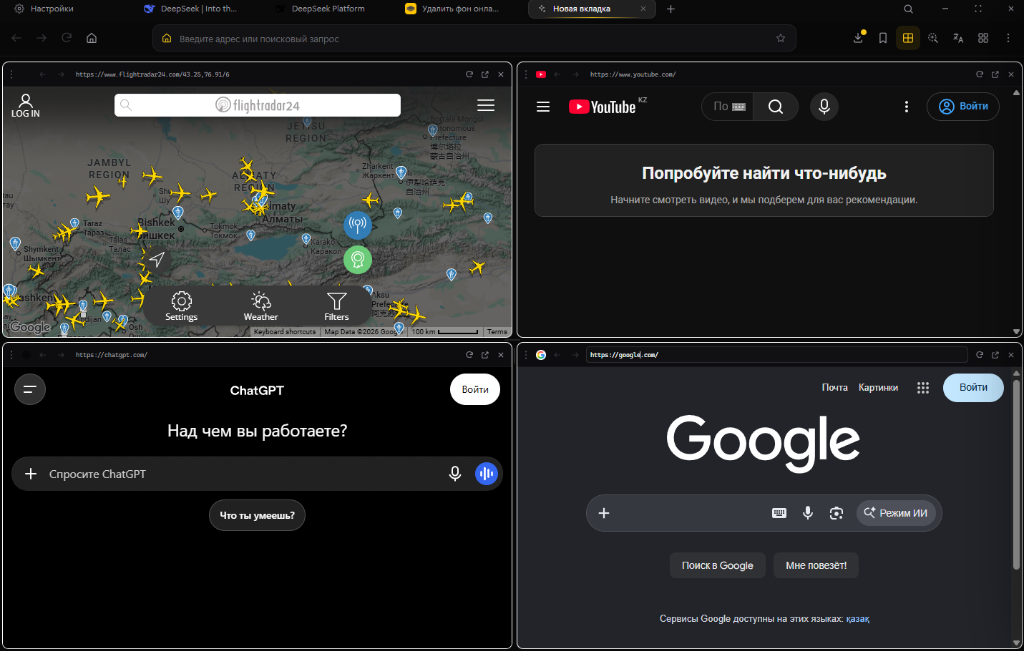
⊞ 4 Websites in 1 Window
🛡️ Ad Blocker (84/100 Score)
🔍 Circle to Search
文A Built-in Translator
⚡ System RAM & Speed Widgets
🔒 Super Incognito + Password
🎨 9 Wallpapers & Custom Themes
⊞ Get from Microsoft Store
⊞
Volli v1.22.0 4-Split & Smart Widgets
84
Ad Blocker Benchmark 84 / 100 Points Out of the Box
⚙️ Settings (v1.22)
🎨 Customize
⊞ 4-Split
✦ Новая вкладка
⌂ Введите адрес или поисковый запрос
文A Volli Translator
🔍 Circle to Search
✨ Circle to Search Active

Click anywhere on the screen to move the circle and search any image, text, or object!

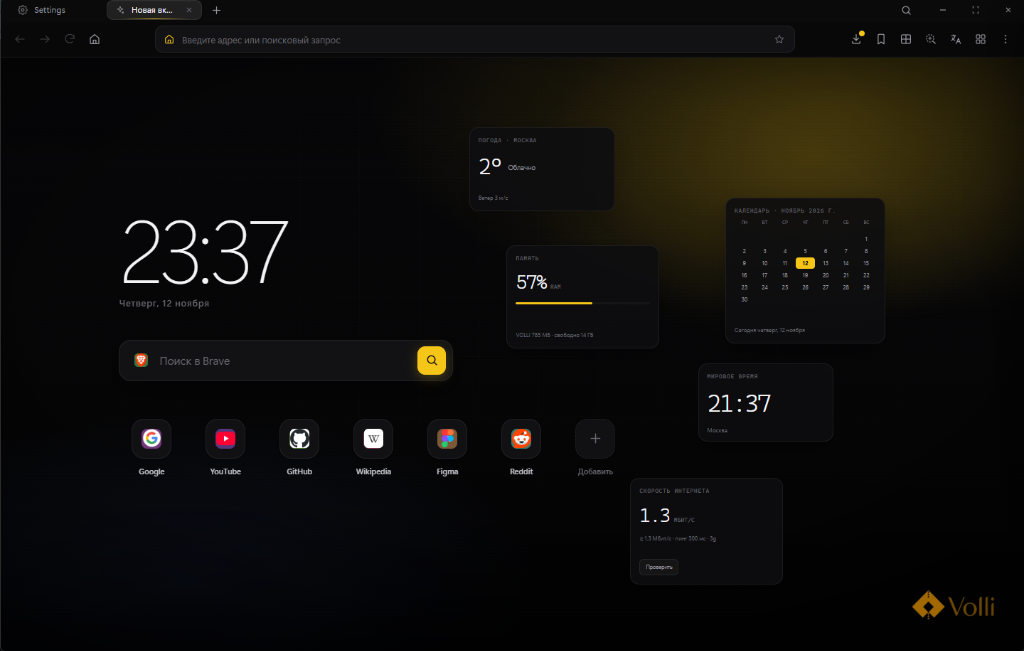
23:37
Четверг, 12 ноября
ПОГОДА • МОСКВА
2° Облачно
Ветер 3 м/с
КАЛЕНДАРЬ • НОЯБРЬ 2026 Г.
ПНВТСРЧТПТСБВС 1 2345678 9101112131415 16171819202122 23242526272829 30
Сегодня четверг, 12 ноября
ПАМЯТЬ
57% RAM
VOLLI 785 МБ • свободно 14 ГБ
СКОРОСТЬ ИНТЕРНЕТА
1.3 МБИТ/С
↓ 1.3 Мбит/с • пинг 300 мс • 3g
МИРОВОЕ ВРЕМЯ
21:37
Москва
Volli 4-Website Split View
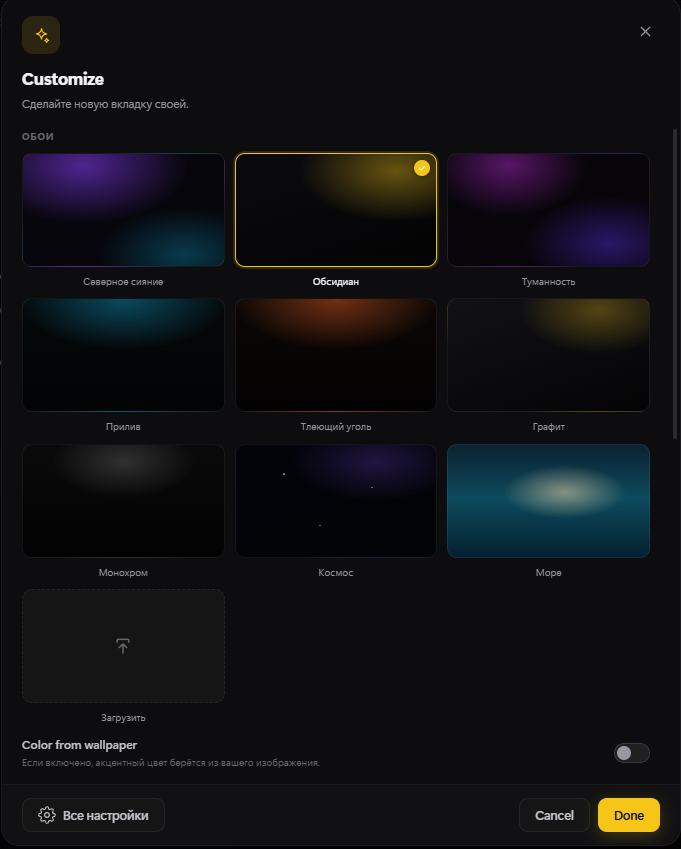
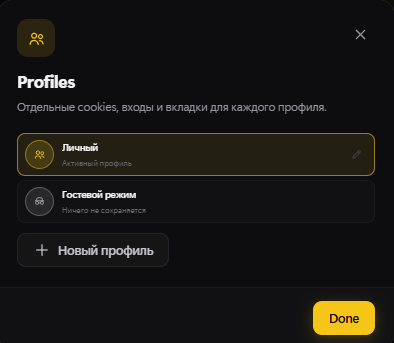
Volli Customize Wallpapers Volli Profiles
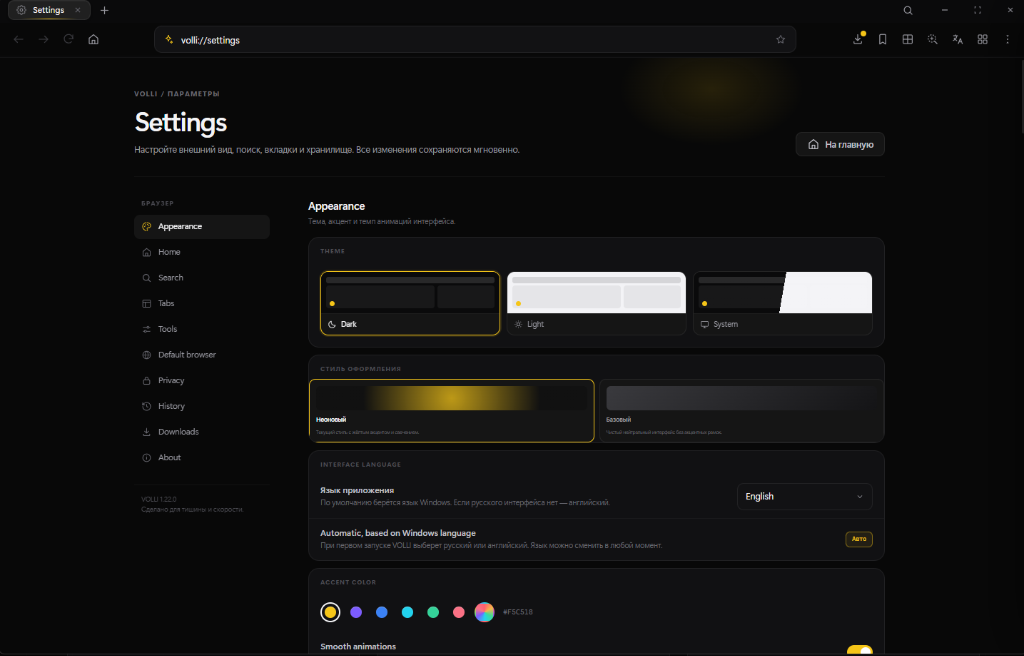
Volli 1.22.0 Settings
Volli 1.22 New Tab Widgets Screenshot
Volli 4-Website Split View Screenshot
Volli Customize Modal Volli Profiles Modal
Volli 1.22.0 Settings Page Screenshot
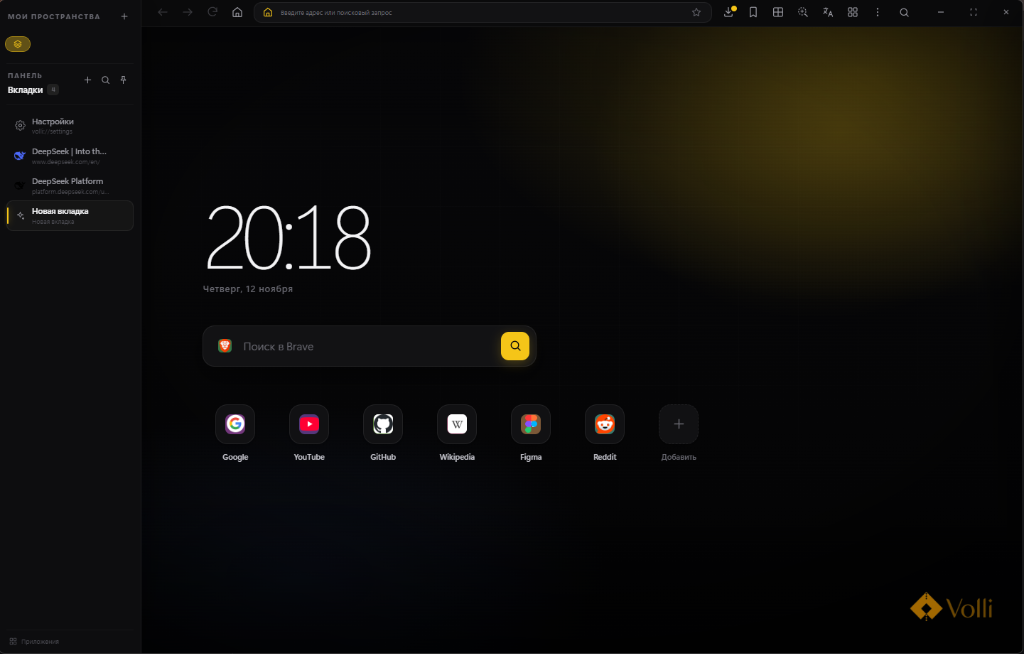
Volli Browser Full Workspace Screenshot
WHAT'S NEW IN VOLLI 1.22

Everything You Wish Your Browser Had. Built In.

No more installing 15 heavy extensions just to get a modern web experience. Volli 1.22 packs quad split-screen, an 84/100 ad blocker, live desktop widgets, custom themes, and multi-profile isolation out of the box.

⊞ QUAD SPLIT-SCREEN ENGINE

Slice 1 Browser Window into 4 Live Websites

Why alt-tab between windows? With Volli's built-in Quad Split View, you can run 4 different websites side-by-side inside a single window — track live flights on Flightradar24, watch YouTube, prompt ChatGPT, and search Google all at once with independent URL bars.

  • 4 independent address bars & reload controls in 1 window
  • Zero lag multitasking for research, streaming, and AI
Volli Browser 4 Websites in 1 Window
NEW TAB WIDGETS • V1.22

Live RAM, Speed Test, Weather & Calendar Widgets

Your new tab is a live command center featuring real-time RAM usage (57% RAM • VOLLI 785 MB), a built-in Internet Speed & Ping tester, local Weather, World Clock, and interactive Calendar.

  • Real-time system RAM bar & memory consumption readout
  • 1-click Internet Speed & Ping benchmark right on the New Tab
  • Weather, World Time, and monthly Calendar widgets
Volli 1.22 New Tab Widgets
CUSTOMIZE & WALLPAPERS

9 Signature Atmospheres & Custom Uploads

Choose from handcrafted backdrops (Obsidian, Northern Lights, Nebula, Glowing Ember, Graphite, Monochrome, Cosmos, Sea), upload your own image, and automatically extract accent colors from your wallpaper.

  • 9 built-in atmospheric presets + custom image upload
  • "Color from wallpaper" automatic accent matching
Volli Customize Wallpapers
VOLLI 1.22 APPEARANCE STUDIO

Neon Glow or Minimalist Base + Custom Accents

Switch between Dark, Light, or System themes, toggle between the signature Neon Gold glow (#F5C518) and clean Base mode, pick any custom accent color, and control smooth animations.

  • Neon style with golden ambient glow or distraction-free Base style
  • Full RGB color picker & instant interface language switching
Volli 1.22 Settings Appearance
ISOLATED PROFILES & SUPER INCOGNITO

Separate Profiles, Guest Mode & Password Lock

Keep completely isolated cookies, logins, and tabs for each profile (Personal, Work, or zero-trace Guest Mode), plus Password-Protected Super Incognito for private sessions.

  • Independent cookies, sessions, and workspaces per profile
  • One-click Guest Mode (nothing saved) & Password-Locked Incognito
Volli Profiles and Guest Mode
DUAL LAYOUT ENGINE

Vertical Workspaces or Classic Top Tabs

Group tabs into dedicated workspaces (Мои Пространства) in the vertical sidebar, or flip to sleek horizontal top tabs anytime.

  • Switch between Vertical Sidebar and Horizontal Tabs in 1 click
  • Built-in Brave Search & quick-access app dock
Volli Workspaces and Vertical Sidebar Volli Horizontal Tabs
84 points out of 100 Ad Blocker Benchmark 🛡️ 84 / 100 AdBlock & Tracker Shield Score
AD BLOCKER BENCHMARK • 84/100

Built-in Ultra Ad & Tracker Blocker

Scoring 84 points out of 100 right out of the box on strict ad-blocking benchmarks. Crush annoying video ads, pop-ups, banners, and hidden spyware trackers automatically with zero extensions needed.

🔍✨
Circle Anything on Screen to Search
VISUAL AI LOOKUP

Circle to Search

See an item, landmark, or uncopyable text inside a video or webpage? Just circle it directly on your screen to trigger an instant visual & AI search without leaving your tab.

EN / JP → 文A → RU
1-Click Native Page & Text Translation
NATIVE TRANSLATOR (文A)

Instant Built-in Translator

Browse the entire world without language barriers. Volli's built-in `文A` toolbar translator converts full webpages and selected paragraphs in a single click.

PURE CHROMIUM • ZERO CLOUD NOISE

Volli is a Chromium browser built for privacy, order, and calm work on the web.

No account required. No cloud sync. No unnecessary noise. Your tabs, bookmarks, history, passwords, and settings are stored strictly on your device, while the interface never distracts you from what matters most.

🚫 No Mandatory Account ☁️ No Cloud Sync Surveillance 💻 100% Local On-Device Storage 🧘 Zero Visual Noise
🛡️

Privacy by Default

  • Browser data, history, bookmarks, and settings are stored strictly locally on your computer.
  • Built-in network and cosmetic filter reduces ads, trackers, and intrusive banners.
  • Native Do Not Track (DNT) protocol support.
  • Camera and microphone access requests are blocked by default.
  • Private windows use a temporary Chromium session: cookies, cache, and site data are deleted immediately after closing the window.
  • Private Mode can be protected with a password, auto-lock timer, and a global "Instant Hide" hotkey.
  • Password storage is encrypted using native Windows security APIs.
🧭

Effortless Navigation

  • Modern vertical sidebar with pinned sites, bookmarks, and workspace tiles.
  • Isolated workspaces with separate tabs, cookies, and accounts for work, personal tasks, and projects.
  • Classic top horizontal tabs or vertical sidebar — your choice.
  • Split screen supporting up to four simultaneous web panels in one window.
  • Side web panels for websites that always need to stay within reach.
  • Search across open tabs, restore closed tabs, plus tab groups and folders.
  • Picture-in-Picture (PiP) mode for floating video playback.
  • Full support for Chrome extensions.
  • One-click bookmark import from Chrome, Edge, Brave, Vivaldi, Opera, Yandex Browser, and Firefox.
🎨

Tailor It to Yourself

  • Dark, Light, and automatic System themes.
  • Custom accent colors and separate color palettes for dark and light themes.
  • Built-in atmospheric wallpapers, custom image uploads, and automatic accent color extraction from wallpapers.
  • Home page widgets: Weather, World Time, Notes, Photos, News, Internet Speed, Memory (RAM), Thought of the Day, and Calendar.
  • Compact or centered New Tab page layout.
  • Fine-tune tab density, corner rounding, transparency, blur intensity, and animation speed.
🧰

Useful Built-in Tools

  • Built-in Password Manager with smart autofill.
  • Integrated Calculator, Notes, Translator, Timer, and live RAM Monitor.
  • Circle to Search: highlight any area of a page to find visually similar images.
  • Fast Find in Page, full-featured Download Manager, and customizable keyboard shortcuts.
  • Automatic full-page translation.
⊞

Built for Windows

  • Powered by the Chromium engine for 100% compatibility with modern websites and web apps.
  • Full GPU hardware acceleration for smooth scrolling and video playback.
  • Crisp High-DPI and ultra-wide display support.
  • Optimized natively for Windows 10 and Windows 11 (x64).
🔒 Volli does not require an account and never uploads your history, bookmarks, or passwords to the cloud. Your browser data stays on your computer. Volli is an independent project and is not affiliated with Google or Microsoft.
VOLLI 1.22.0 FOR WINDOWS LIVE NOW • MICROSOFT STORE & DIRECT .MSIX

Download Volli Browser 1.22

Download Volli v1.22.0 for Windows directly from the official Microsoft Store or grab the standalone VOLLI.msix installer below.

Volli Icon

Volli Browser v1.22.0

4-Split Screen • 84/100 AdBlocker • Live Widgets • Custom Wallpapers

macOS

Apple Silicon (M1–M4) & Intel

  • Format Volli-Universal.dmg
  • Version 1.22.0
  • Status Adding Soon
🐧

Linux

Ubuntu / Debian (.deb) & AppImage

  • Format volli_amd64.deb / AppImage
  • Version 1.22.0
  • Status Adding Soon
🛡️ Why does Windows SmartScreen show a prompt on VOLLI.msix?

Standalone .msix installers downloaded outside the Microsoft Store are often flagged by Windows SmartScreen until thousands of users have run the binary. The package is 100% safe and identical to our Store release — simply double-check the prompt and click "More info" → "Run anyway", or use our official Microsoft Store link for 1-click verified installation.

Waiting for macOS / Linux or future Volli updates?